The Asset Keyboard

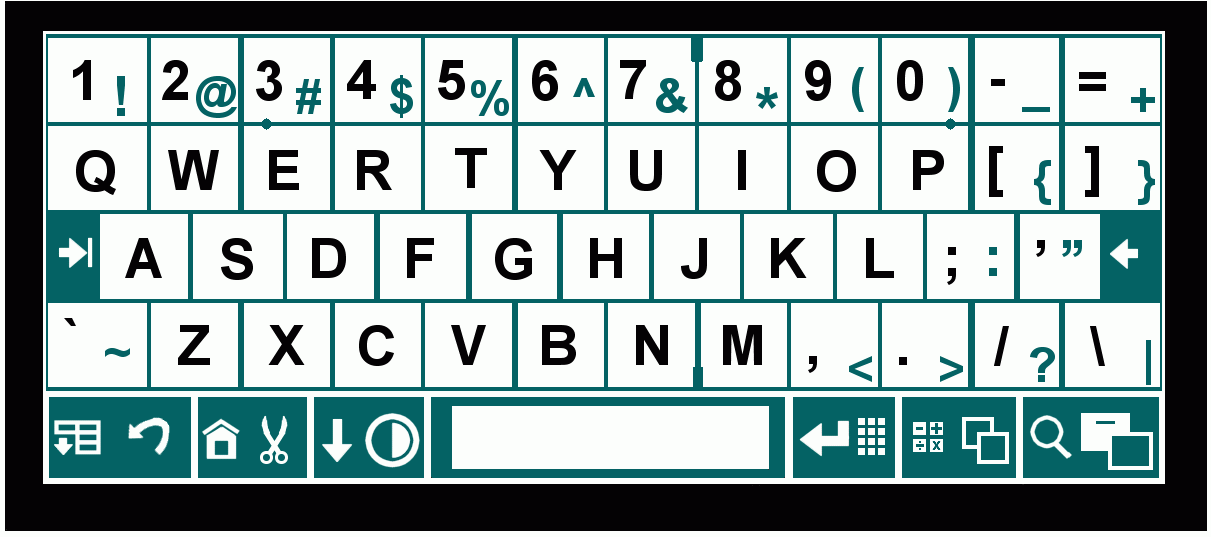
The keyboard you likely have in front of you (named "Qwerty", after its top row), was first available as a typewriter sold in 1874. A common myth is that this keyboard was designed to slow down typists to prevent the keys from jamming; but from the accounts I've seen, it was only designed to prevent the keys from jamming: no more, no less. The original typewriter design simply wasn't very good. Rather than improve it, they rearranged the keys from the original alphabetical order to one that kept common pairs (or "digraphs") of letters away from one another. Or at least, so it is said: I'm a bit puzzled that common digraphs like TH, IN, ER and ED are fairly close to one another.

It is clear, however, that it was not designed for fast typing. At the time, everybody typed with two fingers, and even with two fingers, key jamming was a problem.

Oddly enough, it took 60 years until Qwerty's speed-savvy competitor appeared, Dvorak. Sadly for Mr. Dvorak, his keyboard never really caught on. But there is reason to believe it actually isn't much better than Qwerty, and so, in the computer age, there have been a few attempts to improve upon it.

This page notes problems with the Qwerty and Dvorak keyboards and introduces a new layout called Asset. Asset is designed

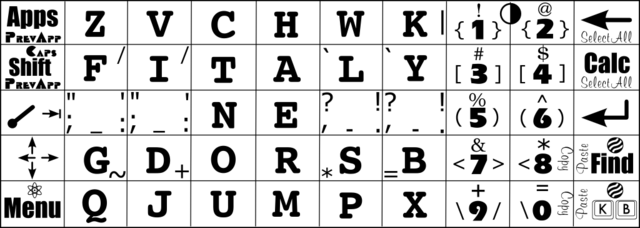
Introducing the Asset keyboard:

Having been fed up with Qwerty, I decided in 2004 to learn Dvorak. I was surprised how difficult it was to learn, and noticed a curious phenomenon: I would often type letters on Dvorak with the correct finger, but the wrong hand. I came to the conclusion that the hand to use was distinct in my brain from the finger. This led me to hypothesize that there were three separate things I had to learn in order to use a new layout:

  1. The hand to use
  2. The finger to use
  3. The finger motion to use
If this was correct, then a key assigned to the same hand as for Qwerty would be easier to learn, and a key assigned to the same finger would be easier still. One of my major beefs with Qwerty was that the keys were on inappropriate rows, so that the hand must do impressive gymnastics to touch-type on it. With these ideas in mind, I designed the original Asset keyboard on May 17, 2004. It gathered dust for awhile, and on November 10, 2006, I tweaked it to the layout shown above. It's called Asset because

Analysis

Principles of layout design

It is widely agreed that the following principles should guide layout design for touch-typing:
While the principles are agreed upon, their relative importance is not. I haven't yet searched for papers that weigh these matters.

I would add these additional considerations:
  1. As I said, it's easier to switch away from Qwerty if the new layout resembles Qwerty.
  2. The B and Y positions are difficult to reach, so take longer to reach.
  3. The index fingers are assigned 5 keys each, so the potential for digraph clashes increases for these keys.
  4. Backspace is a commonly-pressed key. Many have suggested turning Caps Lock into a backspace. Then the question arises of where to put the Caps Lock: shall it replace the old backspace? or replace a rarely used key such as the Right Windows key or Right Alt key? or require the user to hold shift while holding the former Caps Lock key? This is an worthwhile issue to address, but in Asset I have decided to rearrange characters only.
  5. Keys that take longer to reach also strain the hands more; so it seems plausible that a better layout will lead to fewer repetitive stress injuries.
I've divided the alphabet and other common characters into classes according to similar frequencies, i.e. letters within a class occur with similar frequencies. This is based on a sample of over 1000 books (mostly fiction). That page also contains counts of how many words can be formed with a given set of letters--for example, about 30 words can be formed with the Qwerty home keys, ASDFJKL. These counts are based on a word list called 2of12.txt which is found in a package 12dicts-4.0 at Kevin's Word List Page. Note that this list contains abbreviations, some acronyms, and all word variants. By the way, here's a page with other interesting statistics, though it seems to be based on small sample sizes.
Class   Approximate prominance of each character in English documents, respectively
0. Space character   18.7% (may be skewed upward by certain documents that have large runs of spaces)
1. Most common characters E T 9.6% and 7.0% (total 16.6%)
2 A O I N H S R 6.2% to 4.4% (total 36.5%)
3 D L U 3.5% to 2.3% (total 9.0%)
4 M C W G F Y 1.9% to 1.6% (total 10.48%)
5 P , . B 1.3% to 1.2% (total 5.0%)
6. K V " ' - 0.7% to 0.3% (total 2.8%)
7. Least common characters ? X J ; ! Q Z : 0.2% and below (total 0.7%)

See also: Letter frequencies of French and German (based on this page)

French E.ASITN.RUOL.D.XCMP.VQYGFB.HZJ.KW
Spanish EA.OS.RNID.LCTU.MP.BGYVQHF.ZJ.XWK
German E.NIRS.ATDUH.LGOC.M.BFWK.ZVP.JYXQ

Asset's design is English-centric, but I did consider the above frequency information in my design.

Problems with the Qwerty keyboard:

Problems with the Dvorak keyboard:

Advantages of the Asset Keyboard

Asset versus Qwerty
  1. Asset resembles Qwerty. As illustrated above,
  2. All ten of the most common English letters are on home row.
  3. Eight of the nine most common letters are on the home keys, except H, which was placed to match Qwerty.
  4. Over 1000 English words can be formed with the home keys alone, and about 3000 English words can be formed with the home row keys, including such basic words as

    a an are as at did do does has had he her here there in into is it its no neither nor not on or she so to too then than that their these

    Thus, while initially learning this keyboard, many meaningful sentences can be constructed with only the home keys and home row. Additionally, 60 words can be formed from ASET alone and 10 from NIOR alone. Unlike with Qwerty, Asset touch typing tutors do not require users to type dull sets of nonsense words.

  5. Because 12 letters are in the same place, a Qwerty-to-Asset transition course can be developed which starts with those 12 letters plus E. Over 300 words can be formed from these ten letters. Then, if we add the other home keys (ETNIOR), almost 9000 words can be formed! Adding the letter D raises this number to almost 14000.

Problems with Asset:

The design change

(Original design)

On November 10, 2006 I moved several keys to increase Qwerty resemblance. I originally developed Asset in 2004, but so far as I know, no one used it; thus, making changes would be harmless. The new design sets Asset apart from Colemak, which was designed somewhat later than Asset. Colemak boasts Qwerty similarity, but it only seems to be a minor consideration. The new Asset keeps 3 more keys in their Qwerty positions and a further 2 keys on the same hand. With respect to speed, I anticipate one disadvantage, because I returned the "Y" key to its Qwerty position. In my opinion, this is a difficult position to reach and, as a relatively common English letter, it pains me to put it there. However, the increased Qwerty similarity seems to make up for the loss. Also, there's less loss in other languages, where "Y" is rare. So while the changes make it the champion of Qwerty similarity, it still provides substantial potential speed improvements.

At this point I still haven't verified how easy it is to learn Asset. I plan to use myself as a guinea pig in the near future.

Patent?

I don't believe patents should be granted for easy or simple inventions such as this one, nor the tens of thousands of others that are patented every year. Asset is not patented, so it may be used freely by anyone.

Additional thoughts